 Screenshots Clipboard
Screenshots Clipboard: Many shots. One paste.
Screenshots Clipboard is a Chrome and Edge extension that takes full-page, visible and area screenshots and copies many at once, so one paste drops them all in order. Free, or Plus for $2.99 a month or $19 a year.
Beta. Coming soon to the Chrome Web Store and Microsoft Edge Add-ons.

Connect your AI agent
Connect Screenshots Clipboard to Claude, and Claude takes the screenshots for you: a whole site, page by page, turned into a guide with you.
Coming in the next version, after Screenshots Clipboard is in the stores.
How do I paste many screenshots at once?
Take your shots, click the ones you want, and press Copy. One paste drops them all into your doc, email or ticket, in the order you picked.
Ten shots, one paste
The old way
10 screenshots in a bug report: 10 pastes and about 20 trips between your browser and the doc.
With Screenshots Clipboard
Take all 10, press Copy once, paste once. That’s 10 pastes down to 1.

Take your shots
Click Visible, Full page or Area. Each shot lands in your stack, ready to use.
Pick the ones you need
Click a shot to pick it. Its number shows where it lands.
Press Copy, paste once
Gmail, Outlook, Google Docs, Word, Notion and most editors take every shot as its own picture, in order.
Chat boxes like WhatsApp, Slack, Discord and ChatGPT take one picture per paste, so they get all your shots stacked in one. Want them one at a time? Choose Copy one by one, then paste, paste, paste.
What can it capture?
The part of the page you can see, the whole page, or any area you drag. You can also click a part of the page, like a table or a card, to take just that part.
- Visible
- What’s on your screen, in one click.
- Full page
- Top to bottom, with a sticky header shown once. With Plus, it waits for pages that animate as you scroll, so every part shows.
- Area
- Drag a box, or click a part of the page.
Shortcuts: Alt+Shift+V, Alt+Shift+F and Alt+Shift+S. Change them in your browser’s shortcut settings.
Can I keep my shots in folders?
Yes. Each collection is a glass folder in its own colour with its newest shots inside, and you drag a shot onto a folder to move it.

Can I mark up a screenshot?
Yes: open a shot in Edit to add arrows, text boxes, numbers and highlights, crop it, or put shots side by side in a layout. Your original stays as it was.

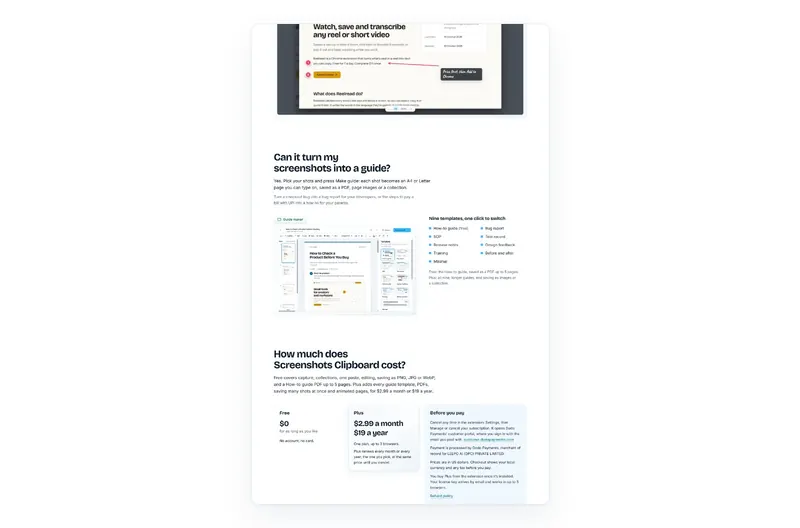
Can it turn my screenshots into a guide?
Yes. Pick your shots and press Make guide: each shot becomes an A4 or Letter page you can type on, saved as a PDF, page images or a collection.
Turn a checkout bug into a bug report for your developers, or the steps to pay a bill with UPI into a how-to for your parents.

Nine templates, one click to switch
- How-to guide (free)
- Bug report
- SOP
- Test record
- Release notes
- Design feedback
- Training
- Before and after
- Minimal
Free: the How-to guide, saved as a PDF up to 5 pages. Plus: all nine, longer guides, and saving as images or a collection.
How much does Screenshots Clipboard cost?
Free covers capture, collections, one paste, editing, saving as PNG, JPG or WebP, and a How-to guide PDF up to 5 pages. Plus adds every guide template, PDFs, saving many shots at once and animated pages, for $2.99 a month or $19 a year.
Free
$0
for as long as you like
No account, no card.
Plus
$2.99 a month
or $19 a year
One plan, up to 3 browsers.
Plus renews every month or every year, the one you pick, at the same price until you cancel.
Before you pay
- Cancel any time in the extension: Settings, then Manage or cancel your subscription. It opens Dodo Payments’ customer portal, where you sign in with the email you paid with. customer.dodopayments.com
- Payment is processed by Dodo Payments, merchant of record for LEEPO AI (OPC) PRIVATE LIMITED.
- Prices are in US dollars. Checkout shows your local currency and any tax before you pay.
- You buy Plus from the extension once it’s installed. Your license key arrives by email and works in up to 3 browsers.
- Refund policy
| What you get | Free | Plus |
|---|---|---|
| Visible, full page and area shots | Yes | Yes |
| Pick shots, copy, paste them all at once | Yes | Yes |
| Copy one by one | Yes | Yes |
| Collections | Yes | Yes |
| Edit: arrows, text, numbers, highlight, crop, layouts | Yes | Yes |
| Save a shot as PNG, JPG or WebP | Yes | Yes |
| Guides | How-to guide as a PDF, up to 5 pages | All nine templates, any length, as a PDF, images or a collection |
| Save picked shots as one PDF | No | Yes |
| Save many shots at once | No | Yes |
| Full page that waits for animated pages | No | Yes |
| Browsers | Any number | Up to 3 with one key |
What can I use Screenshots Clipboard for?
Anything you show with screenshots: a whole page, a bug report, a how-to, a set of design references. Each page below shows the steps for one job.
- Full-page screenshots
The whole page, top to bottom, header once.
- Bug reports
Every step of a bug in one paste.
- How-to guides and SOPs
Screenshots to A4 or Letter pages, saved as a PDF.
- Design references
Whole pages from any site, in colour folders.
- Compare tools
GoFullPage, Scribe, Mobbin and five more, checked 30 Oct 2026.
Questions about Screenshots Clipboard
Where can I paste my shots?
Anywhere that takes pictures. Gmail, Outlook, Google Docs, Word, Notion and most editors take each shot as its own picture, in order, and chat boxes like WhatsApp, Slack and Discord get them stacked in one picture.
Does it work on every website?
It works on normal web pages in Chrome and Edge on a computer. Browsers don’t let any extension capture their own pages, like settings or the extension stores, and there it tells you so in one line.
Are my screenshots uploaded anywhere?
No. Your shots stay in your browser on this computer until you delete them.
Do I need an account?
No. There’s nothing to sign up for, and Plus comes as a license key by email that works in up to 3 browsers.
Can I undo a delete?
Yes. Every delete asks first, and after it Undo stays for a few seconds.
What can’t it do?
It captures web pages in Chrome and Edge on a computer, not other apps or phones, and it doesn’t record video.
How is it different from Mobbin?
Mobbin is a ready-made library of screens from apps and sites it has chosen, with Pro at $120 a year, and it’s the better pick for browsing mobile apps you don’t use. Screenshots Clipboard captures any web page you open, like your own product, a client’s site or a competitor’s, and keeps the shots in your own folders, free or $19 a year for Plus.
Need help with Screenshots Clipboard?
Write to us and a person replies within 2 business days.