Chrome extension, Day 1 of 30
Status: BetaReelread: Watch, save and transcribe any reel or short video
Speed a reel up or slow it down, skip back or forward 5 seconds, or pop it out and keep watching while you work.
Reelread is a Chrome extension that turns what's said in a reel into text you can copy. Free forever for 7 a day, Complete $11 once.
- Status
- Beta. New and still changing. Features and limits may change, and every change is listed in the changelog.
- Launched
- Updated
What does Reelread do?
Reelread catches every word a reel says and keeps it as text, so you can read it, copy it or quote it later. It writes the words in the language they're spoken, in a side panel next to the reel.
How do I turn a reel into text?
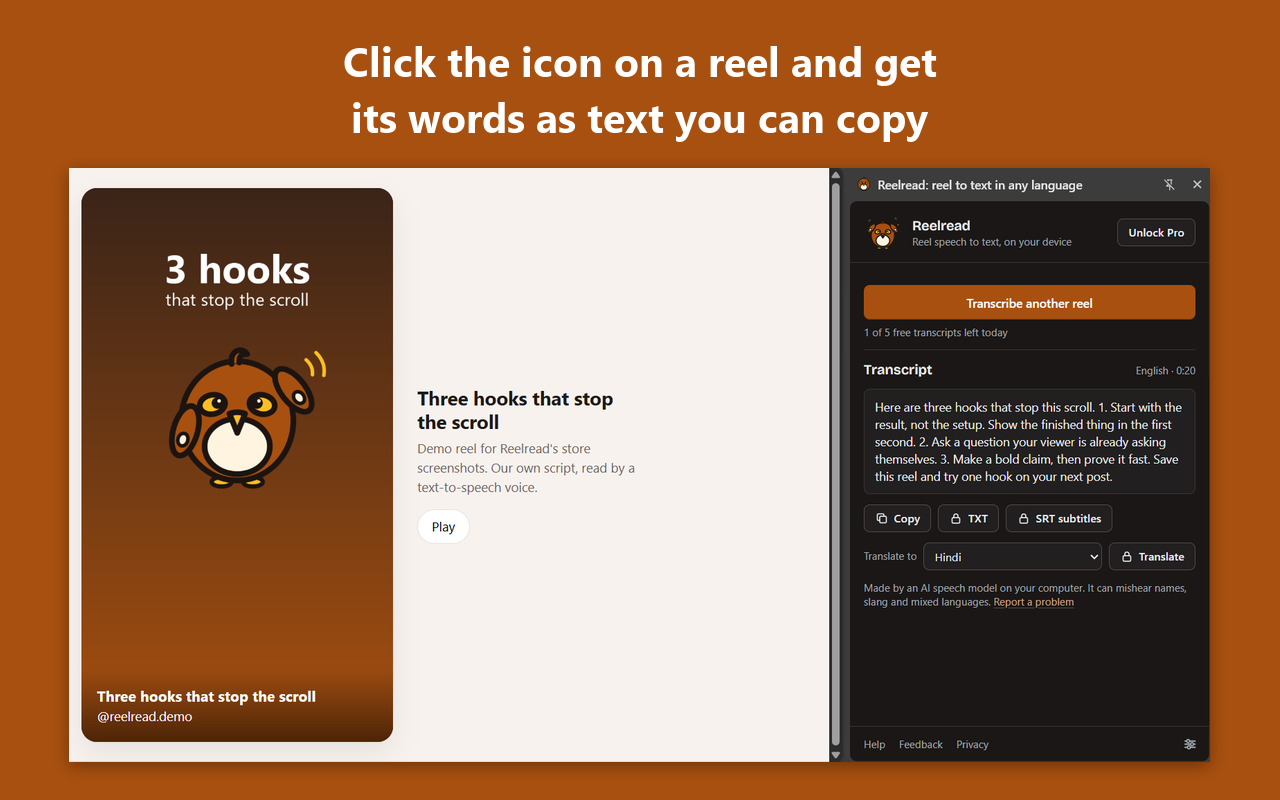
Open a reel, click the Reelread icon, then press Transcribe. The reel plays once from the start, and its words appear as text you can copy.
Open a reel on Instagram, TikTok, YouTube Shorts, Facebook or X, in Chrome or Microsoft Edge on your computer.
Click the Reelread icon. The side panel opens, and nothing is recorded yet.
Press Transcribe. The reel restarts and plays once with its sound on.
Copy the text, or edit any word first. Your last 20 transcripts stay in Recent, each with a link to its reel.
- Swipe to another reel and Reelread pauses, keeping what it heard until you go back or discard it.
- Reelread uses an AI speech model on your computer. It can mishear names, slang and mixed languages, so check the text before you use it.
- The first time, Reelread takes about a minute to activate.
What does Reelread look like on a real reel?
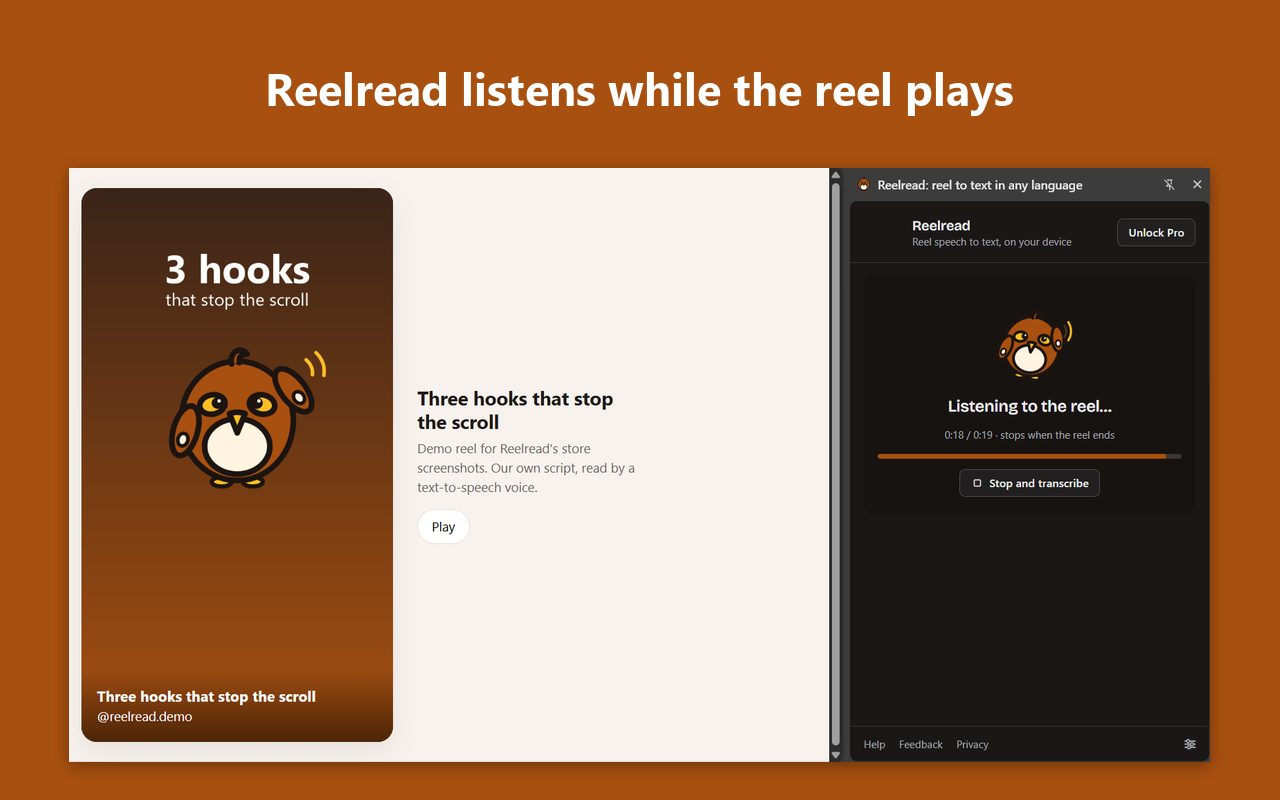
These screenshots show Reelread in Chrome on a demo reel we made ourselves, with our own script. It listens while the reel plays, then its words appear in the side panel.
What can I use Reelread for?
Copy the hook of a reel that worked, keep the script of your own, or read along in a language you're learning. Each page below shows the steps for one job.
- How to get the transcript of an Instagram reelStop pausing reels to type out what they said. Reelread puts an Instagram reel's words in a side panel in Chrome, ready to copy. 7 free a day, no account.
- How to get the transcript of a TikTokGet the words of a TikTok as text without downloading it or pasting its link into a website. Reelread works in Chrome on your computer. 7 free a day.
- How to transcribe a YouTube Short, Facebook reel or X videoOne side panel for the short videos you watch: Reelread turns YouTube Shorts, Facebook reels and X videos into text in Chrome. 7 free a day, no account.
- How to summarize a reel or TikTok with ChatGPT or ClaudeSend a reel's words to ChatGPT or Claude and get the point in a few lines. Reelread turns an Instagram reel or TikTok into text in Chrome. 7 free a day.
- How to get the recipe from an Instagram reel or TikTokTurn what the cook says in an Instagram reel or TikTok into text you can copy into your notes, then check the amounts. Reelread for Chrome, 7 free a day.
- How to translate an Instagram reel to EnglishRead a reel in your language, whether or not its creator turned on translation. Reelread writes its words and translates them in Chrome, for free.
- How to take notes from reelsTurn reels you learn from into notes: Reelread puts a reel's words beside it in Chrome, ready to paste into Notion or Google Docs. 7 free a day.
- How to get the script of a viral reelStop rewatching a viral reel to write down its hook. Reelread puts its script beside it in Chrome, opening line included, ready to copy. 7 free a day.
- How to quote what someone said in a reelQuote a reel without going from memory: Reelread writes out what was said in a reel, TikTok or Short, so you can copy the line and check it. 7 free a day.
- How to turn your reel into a caption, blog post or threadStop retyping what you said on camera. Reelread turns your reel's words into text in Chrome, ready to edit into a caption, post or thread. 7 free a day.
- How to learn a language with reelsReels are good listening practice until a sentence flies past. Reelread writes a reel's words in the language spoken, so you can read along. 7 free a day.
- How to speed up and rewind Instagram reels on PC or MacPlay an Instagram reel at 0.5x to 2x speed, jump back or forward 5 seconds, or pause it, from a side panel on your computer. Free in Reelread for Chrome.
- How to watch reels and videos while you workKeep a reel or video playing in a small window on top of your work, and pause or rewind it without switching tabs. Free in Reelread for Chrome.
- How to find a reel you savedSaved a reel about compound interest and can't find it? Keep reels in Reelread with their words, in your own nests, and search them by what was said.
- How to get a free transcript of any short videoGet a free transcript of any short video in Chrome, from Instagram reels and TikToks to YouTube Shorts, Facebook and X. Free forever for 7 a day.
How much does Reelread cost?
Reelread is free: unlimited transcripts for your first 5 days, then 7 a day. Reelread Complete is $11 once, with no subscription, and adds unlimited transcripts and SRT subtitle downloads.
| What you get | Free | Reelread Complete |
|---|---|---|
| Price | $0 | $11 once, tax included |
| Transcripts | Unlimited for your first 5 days, then 7 a day | Unlimited |
| Copy and edit the text | Yes | Yes |
| Your last 20 transcripts in Recent | Yes | Yes |
| Download as TXT, Markdown or SRT subtitles | TXT and Markdown | TXT, Markdown and SRT |
| Translate into your language | Yes, in desktop Chrome 138 or newer | Yes, in desktop Chrome 138 or newer |
| Reel controls: speed, 5 seconds back or forward, pop out | Yes | Yes |
| Saved, sorted into your own nests | Yes | Yes |
| Send to AI (your own Claude or ChatGPT) | Yes | Yes |
| Account | None | None: a license key for up to 3 browsers |
Free: unlimited transcripts for your first 5 days, then 7 a day. Reelread Complete: lifetime access for $11 including tax, paid once, sold by Dodo Payments, our Merchant of Record.
Questions about Reelread
Which sites does Reelread work on?
Instagram, TikTok, YouTube Shorts, Facebook and X, in Chrome or Microsoft Edge on a computer. Most of our own testing has been on Instagram and YouTube Shorts.
Which languages does it write?
It works best in English, Spanish and Portuguese, and well in French, German, Italian, Russian, Japanese, Korean, Turkish and Indonesian. Hindi and Urdu need the free Hindi pack, which you turn on in Settings.
Is my reel uploaded anywhere?
No. Reelread turns the speech into text on your computer, and the audio and the text are never uploaded.
What happens if I swipe to the next reel?
Reelread pauses and keeps what it heard. Go back to the reel to carry on, or discard it and press Transcribe on the new one.
How accurate is it?
Clear speech comes out well, and you can edit any word before you copy. Reelread uses an AI speech model, so it can mishear names, slang and mixed languages.
What can’t it do?
It writes down speech only: on-screen text isn’t captured, and a reel with only music ends as “Music, no speech found” without using a free transcript. It runs in Chrome and Edge on a computer, not in phone apps, and one recording stops at 10 minutes.
Do I need an account?
No. Reelread has no account or login, and Reelread Complete comes as a license key that works in up to 3 browsers.
What’s new in Reelread?
Changes you can see, newest first. Every change is also in the changelog.
- Reelread 1.0.3: unlimited free transcripts for your first 5 days, then 7 a day.
- Free now includes translation into your language, TXT and Markdown downloads, Send to AI and Saved with your own nests.
- Reel controls in the side panel: speed from 0.5x to 2x, 5 seconds back or forward, the next reel, and a pop-out window.
- Reelread Complete, $11 once, adds unlimited transcripts and SRT subtitles with timings.
- Already using Reelread? Your 5 unlimited days start with this update.
- Reelread 1.0.0 passed Google's review, with its store page in 11 languages.
- Version 1.0.0 sent to the Chrome Web Store for review, with its store page in 11 languages.
- Delete any one transcript from Recent, with Undo, or clear them all in Settings.
- Hindi and Urdu: turn on the free Hindi pack in Settings.
Need help with Reelread?
Write to us and a person replies within 2 business days.