 Screenshots Clipboard
How to edit a screenshot in Chrome
Chrome on a computer has no screenshot editor: Google tested one and removed it in 2023. Edit the shot with your computer’s own tool instead, Snipping Tool on Windows, Markup on a Mac or the Gallery app on a Chromebook, or add an extension that edits inside Chrome.
By Manish Kalyan, who makes Screenshots Clipboard. .
In a hurry? Screenshots Clipboard does this in one click. See how
Does Chrome have a built-in screenshot editor?
Not on a computer. Google tested an editor in Chrome in 2022 and removed it in February 2023, before it launched.
How do I edit a Chrome screenshot on Windows?
Use Snipping Tool, which comes with Windows.
- Press Win+Shift+S and drag over the part of the page.
- Click the preview that pops up to open the editor.
- On Windows 11, crop it with Image crop, then mark it with the Pen, the Highlighter or Shapes.
- Press Ctrl+C to copy it, or Ctrl+S to save it.
How do I edit a Chrome screenshot on a Mac?
Use Markup, which opens from the screenshot itself.
- Press Cmd+Shift+4 and drag over the part of the page.
- Click the thumbnail in the corner of the screen, then Markup.
- Crop it, then add shapes, a text box or a sketch.
- Click Done to save it.
How do I edit a screenshot on a Chromebook?
Your Chromebook copies each screenshot and saves it to Downloads, and the Gallery app can crop, rotate and resize it.
- Press the Screenshot key, or Shift+Ctrl+Show windows, and choose the part of the screen.
- Open the screenshot from Downloads; it opens in Gallery.
- Choose Crop & rotate or Rescale, then save.
What edits does a screenshot usually need?
Most need a crop and one or two marks, not a photo editor.
- Crop to the part people need to see.
- Point at one thing with an arrow, a box or a number.
- Add a short note when the screen can’t speak for itself.
- Cover private details before you share it.
Where Screenshots Clipboard helps
Screenshots Clipboard is a Chrome, Edge, Firefox and Brave extension with an editor that opens over the page you’re on. Crop a shot, add arrows (straight, curved or curly), text in five fonts, numbers, boxes, ovals, a pen and highlights, or put shots side by side. Edit many shots one after another, then save each as a copy, or over the original, which you can get back any time. Editing is free. Plus is $2.99 a month or $19 a year.
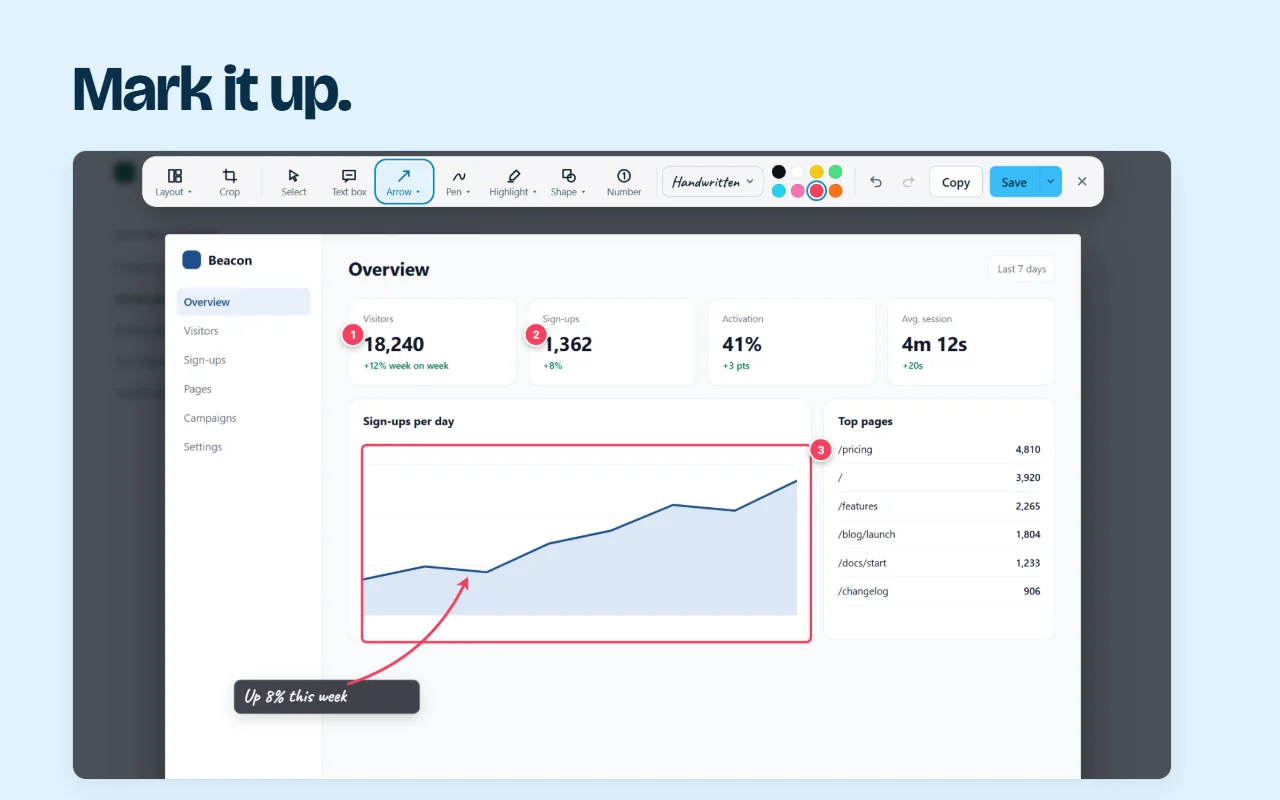
It works in Chrome, Edge, Firefox and Brave on a computer.

Questions
Can I edit a screenshot without downloading anything?
Yes. Snipping Tool, Markup and the Chromebook’s Gallery app come with your computer.
Can I crop a screenshot in Chrome?
Not in Chrome itself on a computer. Crop it in your computer’s screenshot tool, or take only the part you need to begin with.
Over to you
What edit do you make to almost every screenshot?
Write to us, and a person replies. Write to us
Sources
- 9to5Google: Chrome's screenshot editor removed (8 Feb 2023), checked 6 Nov 2026
- Microsoft: use Snipping Tool to capture screenshots, checked 4 Nov 2026
- Apple: take a screenshot on Mac, checked 4 Nov 2026
- Apple: mark up files on Mac, checked 4 Nov 2026
- Google: take a screenshot on a Chromebook, checked 6 Nov 2026
- Google: open and edit photos on a Chromebook, checked 6 Nov 2026